Tips แก้ปัญหา Domain ทุกองค์กร Flush DNS ช่วยแก้ปัญหาอะไรได้บ้าง

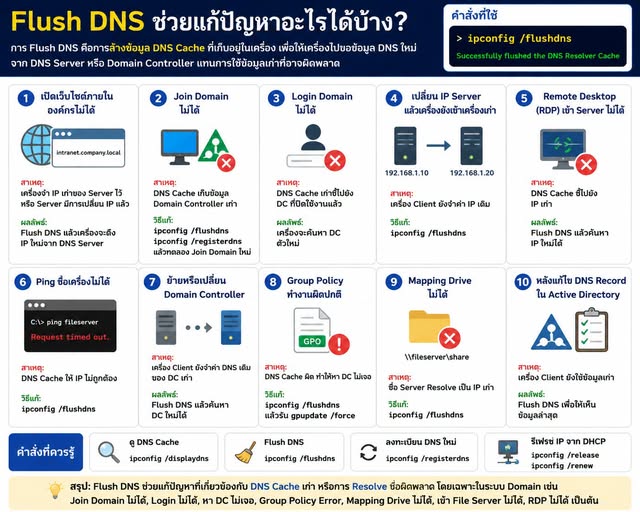
Flush DNS คือการล้างข้อมูล DNS Cache ที่เก็บอยู่ในเครื่อง Windows เพื่อให้เครื่องไปสอบถามข้อมูล DNS ใหม่จาก DNS Server หรือ Domain Controller แทนการใช้ข้อมูลเก่าที่อาจผิดพลาด
คำสั่งที่ใช้ :
ipconfig /flushdns
เมื่อรันคำสั่งสำเร็จจะขึ้นข้อความ :
Successfully flushed the DNS Resolver Cache
-------------------------------------
ปัญหาที่ Flush DNS ช่วยแก้ได้
 1. เปิดเว็บไซต์ภายในองค์กรไม่ได้
เช่น
• intranet.company.local
• fileserver.company.local
• hr.company.local
สาเหตุ :
• เครื่องจำ IP เก่าของ Server ไว้
• Server มีการเปลี่ยน IP แล้ว
ผลลัพธ์ :
• Flush DNS แล้วเครื่องจะดึง IP ใหม่จาก DNS Server
-------------------------------------
2. Join Domain ไม่ได้ตัวอย่าง Error
The specified domain either does not exist or could not be contacted
สาเหตุ :
• DNS Cache เก็บข้อมูล Domain Controller เก่า
วิธีแก้ :
ipconfig /flushdns
ipconfig /registerdns
 แล้วทดลอง Join Domain ใหม่
-------------------------------------
3. Login Domain ไม่ได้อาการ :
• Login ช้า
• ขึ้น Domain Not Available
• หา Domain Controller ไม่เจอ
สาเหตุ :
• DNS Cache เก่าชี้ไปยัง DC ที่ปิดใช้งานแล้ว
Flush DNS จะช่วยให้เครื่องค้นหา DC ตัวใหม่-------------------------------------
4. เปลี่ยน IP Server แล้วเครื่องยังเข้าเครื่องเก่าตัวอย่าง
Server IP เดิม IP ใหม่
File Server 192.168.1.10 192.168.1.20
แม้ DNS จะอัปเดตแล้ว แต่เครื่อง Client ยังจำค่าเดิมผลคือ :
• เข้า File Server ไม่ได้
แก้ไข :
ipconfig /flushdns
-------------------------------------
5. Remote Desktop (RDP) เข้า Server ไม่ได้ตัวอย่าง
Remote Desktop can't find the computer
สาเหตุ :
• DNS Cache ชี้ไปยัง IP เก่า
Flush DNS จะบังคับให้ค้นหา IP ใหม่-------------------------------------
6. Ping ชื่อเครื่องไม่ได้ตัวอย่าง
ping fileserver
แล้วได้ IP ไม่ถูกต้องตรวจสอบ :
ipconfig /displaydns
ล้าง Cache :
ipconfig /flushdns
-------------------------------------
7. ย้ายหรือเปลี่ยน Domain Controllerหลังจาก
• เพิ่ม DC ใหม่
• ย้าย FSMO Role
• Demote DC เก่า
เครื่อง Client บางเครื่องอาจยังจำค่า DNS เดิม
Flush DNS จะช่วยให้เครื่องค้นหา Domain Controller ใหม่-------------------------------------
8. Group Policy ทำงานผิดปกติอาการ :
gpupdate /force
แล้ว Error
Windows could not locate a domain controller
สาเหตุ :
• DNS Cache ผิด
แก้ไข :
ipconfig /flushdns
gpupdate /force
-------------------------------------
9. Mapping Drive ไม่ได้ตัวอย่าง
\\fileserver\share
เปิดไม่ได้
สาเหตุ :
• ชื่อ Fileserver ถูก Resolve เป็น IP เก่า
Flush DNS ช่วยให้ค้นหา IP ปัจจุบัน-------------------------------------
10. หลังแก้ไข DNS Record ใน Active Directoryเช่น
• เปลี่ยน A Record
• เปลี่ยน CNAME
• เปลี่ยน Alias
• เปลี่ยน IP Server
เครื่อง Client อาจยังใช้ข้อมูลเก่า
ต้อง Flush DNS เพื่อให้เห็นข้อมูลล่าสุด-------------------------------------
คำสั่งที่ควรใช้ร่วมกันดู DNS Cache
-> ipconfig /displaydns
Flush DNS
-> ipconfig /flushdns
ลงทะเบียน DNS ใหม่
-> ipconfig /registerdns
รีเฟรช IP จาก DHCP
-> ipconfig /release
-> ipconfig /renew
-------------------------------------
สรุปสุดท้ายเข้าใจง่ายFlush DNS ไม่ได้แก้ทุกปัญหาในระบบ Domain แต่ช่วยแก้ปัญหาที่เกี่ยวข้องกับ DNS Cache เก่า หรือการ Resolve ชื่อผิดพลาด ได้ดีมาก
โดยเฉพาะปัญหา :
 Join Domain ไม่ได้ Login Domain ไม่ได้ หา Domain Controller ไม่เจอ Group Policy Error Mapping Drive ไม่ได้ เข้า File Server ไม่ได้ Remote Desktop ไม่ได้ เปลี่ยน IP Server แล้วเครื่องยังจำค่าเดิม ในระบบ Active Directory Domain Services (AD DS) ปัญหากว่า 70-80% ที่เกี่ยวกับการเชื่อมต่อมักมีสาเหตุมาจาก DNS ดังนั้นการตรวจสอบและ Flush DNS จึงเป็นขั้นตอนแรกที่ผู้ดูแลระบบมักใช้ในการแก้ปัญหา